Posts

Showing posts with the label file handling

Creating Entity-relationship Diagrams (E-R Diagrams)
Image
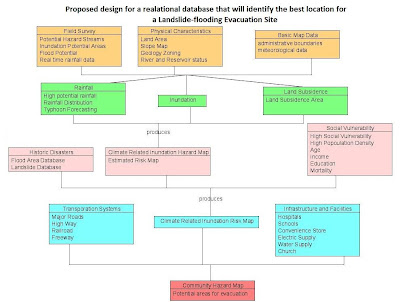
Last semester for my introductory GIS class, part of a laboratory exercise is on creating E-R Diagrams which for me is a simple graph of the relationships between different objects within an interface. In programming, it is much like the UML (Unified Modeling Language) class diagrams that we are making before proceeding to the actual coding. E-R diagram  A data model, which is a high level description of the available data, is needed in storing relevant information in a database. In designing databases, there should be a conceptual and the physical phase. The creation of E-R (entity-relationship) diagrams belong to the conceptual phase. The E-R diagram serves as the blueprint before creating a database. There are things such as entity sets within an E-R Diagram 1. Entity – person, place, object, event, concept.  representation in the E-R diagram - table in the database shape in the E-R diagram -  RECTANGLE  2. Entity sets – collection of similar entities (sa...
Free PDF to WORD options

Image
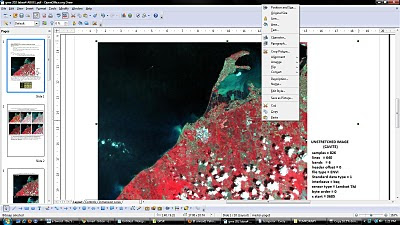
Latest versions of Microsoft Office and OpenOffice are already capable of  saving your  documents from doc, docx or odt to  pdf format. The reverse is quite unusual. There are trial versions of pdf to word converter with their limitations of course. PDF2Word  can only be used 100 times and allows the first 5 pages only to be converted to .doc format. Fonts change and the layout was a bit different after conversion.  The most useful for me is using the OpenOffice PDF Import Extension . If you have OpenOffice  installed in your pc, just double click the downloaded extension and an installation dialog will guide you through.  The pdf opens in OpenOfficeDraw and lets you do basic editing of text and images in the document. You can save the edited file as another pdf or export as an image file or in html format.  It's free and it's open source so let's see more developments of this extension on OpenOffice. It would be nicer if pdf files can be ope...

Open and Save File Classes using JAVA

Here's a java class that will handle basic opening and saving of files with the use of a JFileChooser. /**********************************************************************************/ import javax.swing.JFileChooser; import javax.swing.JOptionPane; import java.io.*; public class OpenSaveFile { public OpenSaveFile() { // TODO: Add your code here } public static File getFile(){ JFileChooser fileChooser = new JFileChooser(); fileChooser.setCurrentDirectory(new File("C:\\Users\\vista2\\Documents\\mel\\work and play\\masters\\gme202\\labex3\\TwoDConformal\\")); int result = fileChooser.showOpenDialog( null ); // if user clicked Cancel button on dialog, return if ( result == JFileChooser.CANCEL_OPTION ){ JOptionPane.showMessageDialog( null, "Bye", "Cancel", JOptionPane.ERROR_MESSAGE ); System.exit( 1 ); } File fileName = fileChooser.getSelectedFile(); // get selected file // display error if invalid if ( ( fileName == null ...