Posts

Showing posts with the label java

Creating Entity-relationship Diagrams (E-R Diagrams)
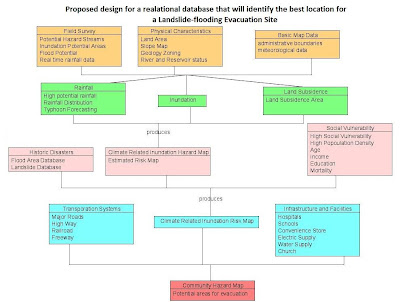
Image
Last semester for my introductory GIS class, part of a laboratory exercise is on creating E-R Diagrams which for me is a simple graph of the relationships between different objects within an interface. In programming, it is much like the UML (Unified Modeling Language) class diagrams that we are making before proceeding to the actual coding. E-R diagram  A data model, which is a high level description of the available data, is needed in storing relevant information in a database. In designing databases, there should be a conceptual and the physical phase. The creation of E-R (entity-relationship) diagrams belong to the conceptual phase. The E-R diagram serves as the blueprint before creating a database. There are things such as entity sets within an E-R Diagram 1. Entity – person, place, object, event, concept.  representation in the E-R diagram - table in the database shape in the E-R diagram -  RECTANGLE  2. Entity sets – collection of similar entities (sa...

Image Registration and Georeferencing in ENVI (Cavite, Philippines)

Image
Georeferencing and Registration Methodology T he following steps were undertaken for the rectification or georeferencing of the image: 1. I have created a subset of the province of Cavite from the Landsat ETM+image that I have downloaded from GLCF . A topographic map of the equivalent subset has been obtained with the following basemap information. Fig. 1: Basemap information Scale 1: 50000.. Sheet name Cavite, Philippines Sheet number 3163 II Source NAMRIA 2.  A scanned 1:50000 topographic map of Cavite appears below. Fig. 2a: 1:50000 Topographic map of Cavite 3.  An Image-to-map registration was performed using the coordinates on the boundary of the map as ground control points. A total of 10 points are obtained with a total RMSE of 0.396853. 4.  An Image-to-Image registration was later performed, yielding 9 GCPs with a total RMS error of 0.970929. The Landsat ETM+ image that I have obtai...

Open and Save File Classes using JAVA

Here's a java class that will handle basic opening and saving of files with the use of a JFileChooser. /**********************************************************************************/ import javax.swing.JFileChooser; import javax.swing.JOptionPane; import java.io.*; public class OpenSaveFile { public OpenSaveFile() { // TODO: Add your code here } public static File getFile(){ JFileChooser fileChooser = new JFileChooser(); fileChooser.setCurrentDirectory(new File("C:\\Users\\vista2\\Documents\\mel\\work and play\\masters\\gme202\\labex3\\TwoDConformal\\")); int result = fileChooser.showOpenDialog( null ); // if user clicked Cancel button on dialog, return if ( result == JFileChooser.CANCEL_OPTION ){ JOptionPane.showMessageDialog( null, "Bye", "Cancel", JOptionPane.ERROR_MESSAGE ); System.exit( 1 ); } File fileName = fileChooser.getSelectedFile(); // get selected file // display error if invalid if ( ( fileName == null ...